
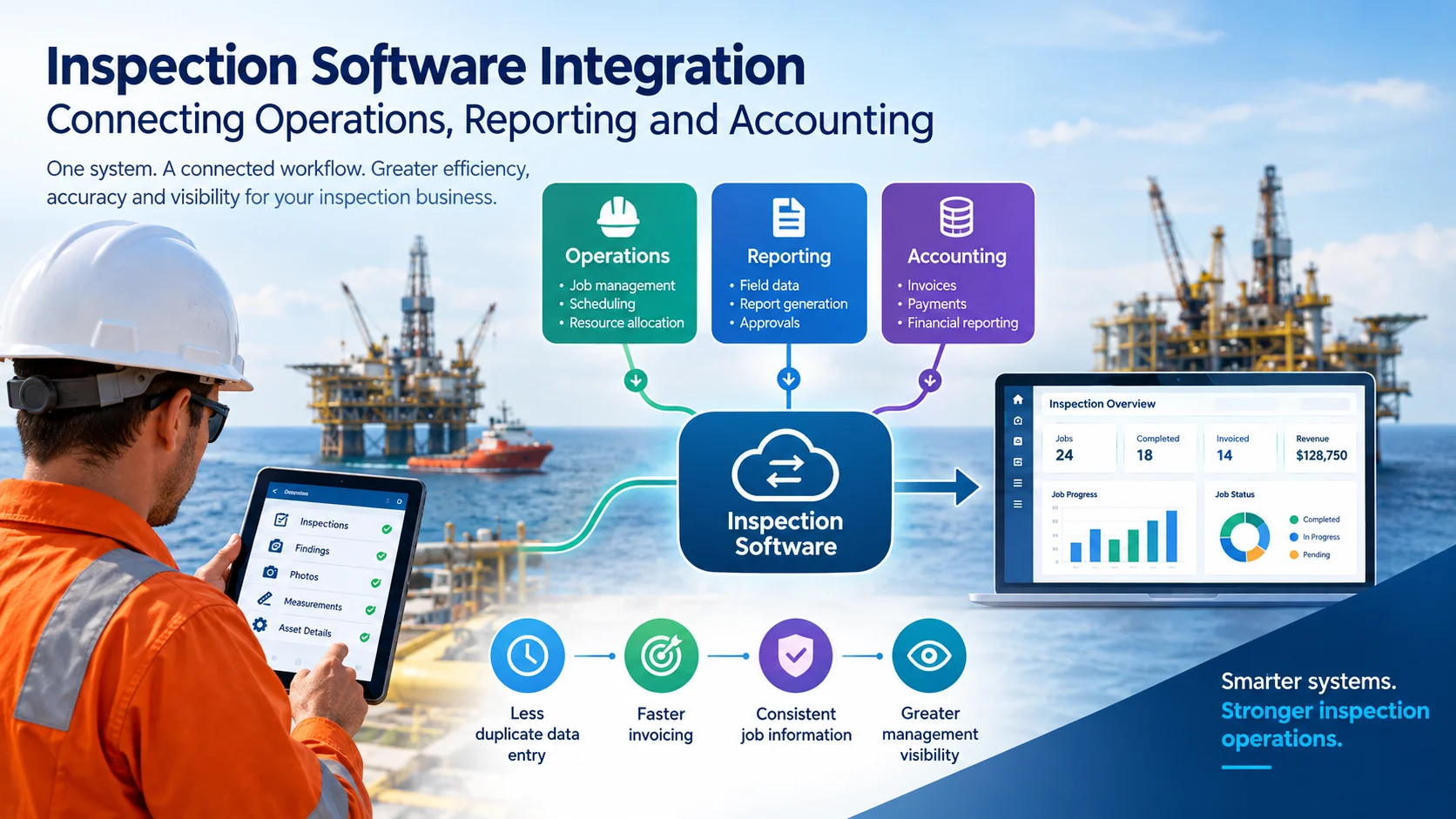
Inspection companies in the oil and gas industry manage much more than inspections. They also coordinate jobs, assign inspectors, track equipment, prepare technical reports, manage client approvals, and process invoices. When these activities run through separate systems, even a well-organised team can lose valuable time switching between spreadsheets, emails, accounting software, and inspection records.
Inspection software integration connects these activities so operational data can flow between inspection management, reporting, and accounting systems. As a result, teams can reduce duplicate data entry, improve billing accuracy, and gain a clearer picture of job progress and business performance.
For oil and gas inspection companies handling multiple projects, remote sites, and strict reporting requirements, this connection can make daily operations significantly easier to manage.
In this guide, we explain how inspection software integration works, which systems businesses should connect, what to automate first, and how to choose the right solution for inspection operations.
Inspection software integration is the process of connecting inspection management software with other business systems, such as accounting platforms, enterprise resource planning (ERP) software, customer relationship management (CRM) systems, and document management tools.
Instead of entering the same information into several applications, an integrated workflow allows authorised systems to exchange relevant data automatically or through controlled synchronisation.
For example, when an oil and gas inspection company receives a new job, the job details can be used to coordinate the inspection, generate the final report, update job costs, and support invoice preparation.
The exact level of automation depends on the software, available integrations, and the company’s business rules.
A typical integrated workflow follows several steps.
First, the company records the client, job number, inspection scope, quotation, and commercial details. Next, the operations team assigns inspectors, equipment, and site resources. During the inspection, field personnel record findings, measurements, photographs, checklists, and relevant asset information.
Once the fieldwork is complete, the inspection team reviews the collected data and prepares the required report or certificate. After the necessary approvals, the business transfers authorised job information and billable items to the accounting workflow.
Finally, the finance team prepares invoices, monitors payment status, and reviews job profitability.
Consequently, operations and finance teams can work with more consistent information instead of maintaining separate records for the same job.
Oil and gas inspection work often involves multiple teams, remote locations, detailed technical documentation, and client-specific reporting requirements. Therefore, disconnected systems can create problems that extend beyond administration.
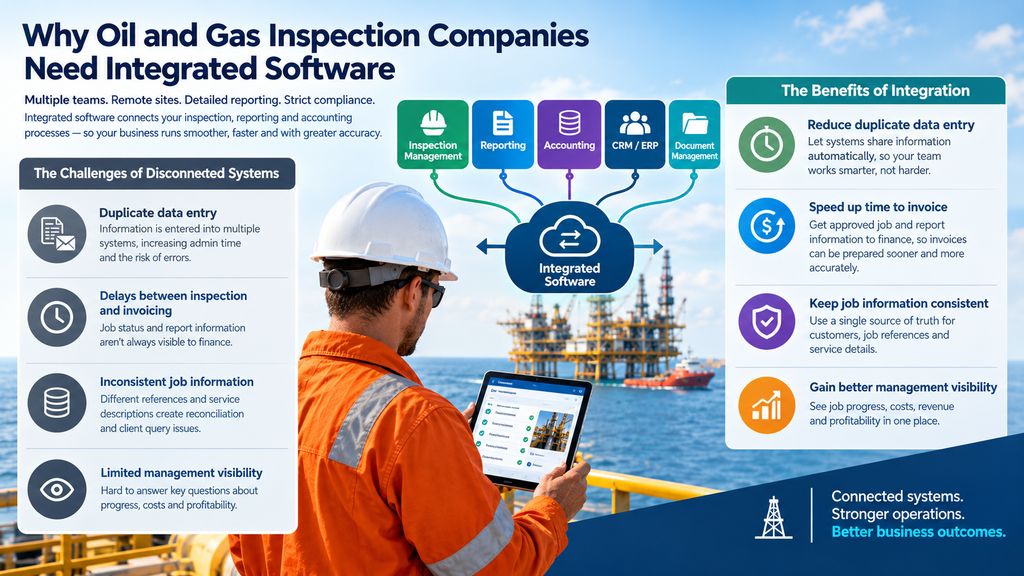
Consider a company that completes 80 inspection jobs every month. If employees must enter client details, job references, inspection dates, and service information into three separate systems, the administrative workload can quickly increase.
Moreover, every repeated entry creates another opportunity for a typing error or outdated record.
An integrated inspection management system can reduce unnecessary re-entry by making relevant job information available to connected workflows.
Completing an inspection does not always mean the job is commercially complete. The company may still need to review findings, finalise the report, obtain client approval, or submit supporting documents.
If the finance team does not know when these requirements have been met, invoice preparation may be delayed.
By connecting job status and report completion information, companies can establish clearer handover points between operations and accounting.
A job number in the inspection system might differ from the reference used by finance. Similarly, a quotation may contain a different service description from the final job record.
These differences can complicate invoice reconciliation and client queries.
A shared job reference, consistent customer records, and clearly defined data ownership help keep information aligned across systems.
When operational and financial information is stored separately, management may struggle to answer important questions.
For example, how many jobs are completed but not yet invoiced? Which reports are still awaiting approval? What are the outstanding costs for a particular project? Which clients have overdue invoices? Are certain inspection services generating lower margins than expected?
Integrated data can help management answer these questions faster, provided the connected systems capture the necessary information.
Not every inspection business needs a complex enterprise integration. The right starting point depends on how jobs are managed, how reports are delivered, and how invoices are prepared.
| System | Information Exchanged | Business Benefit |
|---|---|---|
| Inspection management software | Jobs, inspectors, findings, assets, report status | Better control over inspection delivery |
| Accounting software | Customer billing details, approved job data, invoices | Less manual financial administration |
| CRM software | Client details, quotations, opportunities, service history | Better visibility from sales to delivery |
| ERP systems | Job costs, purchasing, resources, financial records | Improved operational and financial coordination |
| Document management systems | Reports, certificates, photographs, supporting documents | Easier document access and traceability |
| Scheduling tools | Inspector availability, assignments, job dates | Better resource planning |
| Business intelligence tools | Job volumes, completion times, revenue, costs | More informed management decisions |
However, integration does not automatically mean every system shares every field. Businesses should define which information must move between applications, which system owns each record, and who is responsible for approving changes.
The greatest value often comes from connecting the complete job lifecycle rather than automating one isolated task.
The workflow begins when a quotation is accepted or a new inspection job is created.
The operations team needs access to the agreed scope, client requirements, inspection type, asset details, location, schedule, and assigned personnel.
When this information is available in the inspection management system, the team can coordinate the work without repeatedly requesting details from sales or administration.
For oil and gas inspection providers, this can be especially useful when managing non-destructive testing (NDT), lifting equipment inspections, dropped object surveys, pressure equipment inspections, and other specialised services.
For example, a company receives a request for an offshore lifting equipment inspection. The job record identifies the client, location, required inspection scope, equipment, and reporting requirements. The coordinator then assigns an inspector and tracks the job through the required stages.
As a result, the team has a clearer operational record before the inspection begins.
Inspection findings are only useful when they are recorded accurately and presented in a format that clients and relevant stakeholders can understand.
Inspectors may collect measurements, photographs, checklists, equipment identifiers, observations, and recommendations in the field. The reporting workflow then uses this information to prepare the required technical documentation.
Integrated inspection software can reduce the need to transfer these details manually between field records and report templates.
For example, a reporting workflow may use recorded asset information and inspection findings to populate relevant report fields. The responsible reviewer can then check the results before the final report is issued.
This approach can improve consistency and traceability. However, automated report generation should not replace the technical review, approval, or sign-off required by company procedures and applicable standards.
Once the required work and commercial checks are complete, the business needs to turn the job into a financial transaction.
Depending on the agreement, an invoice may include a fixed inspection fee, additional testing, travel expenses, equipment charges, mobilisation costs, or other approved services.
Without a defined handover, finance employees may need to review emails, quotations, job sheets, and spreadsheets to confirm what should be billed.
An integrated workflow can make approved commercial information available to accounting, helping finance teams prepare invoices with fewer manual checks.
For example, the inspection system may provide a completed job reference, agreed service description, approved additional charges, and supporting documents. The accounting system can then use the relevant information according to its integration rules.
It is important to remember that job completion does not automatically authorise invoicing. Companies should define the conditions that trigger the accounting handover, including any required report approval, purchase order, client acceptance, or commercial authorisation.
The final stage is turning operational and financial information into useful business insight.
When job records can be matched with accounting data, management may be able to compare completed work, invoiced revenue, outstanding payments, and recorded job costs.
This makes it easier to identify operational bottlenecks and investigate financial discrepancies.
For instance, if a large number of completed jobs remain uninvoiced, managers can investigate whether the cause is missing documentation, an approval delay, incomplete commercial details, or an internal handover problem.
The goal is not simply to move data between systems. It is to make that data useful for business decisions.
Consider an inspection company that provides NDT and lifting equipment inspection services to oil and gas clients.
Previously, its coordinators managed jobs in spreadsheets, inspectors submitted field information separately, reports were prepared using document templates, and finance employees collected billing details through emails.
This arrangement created several avoidable problems. Coordinators repeatedly requested information already recorded elsewhere. Report preparation depended on manually transferring inspection details. Finance employees had to confirm job completion before preparing invoices. Meanwhile, managers struggled to reconcile completed work with financial records.
The company decides to introduce a connected workflow.
| Stage | Integrated Process | Expected Improvement |
|---|---|---|
| Quotation accepted | Create or confirm the job record and commercial reference | Clearer job ownership |
| Inspection scheduled | Assign personnel, equipment, and dates | Better coordination |
| Fieldwork completed | Capture findings and supporting evidence | More consistent records |
| Report reviewed | Generate and approve the required documentation | Clearer reporting status |
| Job approved for billing | Transfer authorised billing information | Less manual re-entry |
| Invoice processed | Track invoice and payment status in accounting | Better financial visibility |
| Management review | Compare operational and financial indicators | More informed decisions |
This approach can provide clearer job ownership, more consistent records, smoother reporting handovers, and better financial visibility.
These are expected process improvements rather than guaranteed financial results. Actual outcomes depend on the company’s existing workflow, implementation quality, staff adoption, and the capabilities of the connected systems.
Integration and automation are related, but they are not identical.
Integration connects systems so they can exchange information. Automation uses defined rules to perform tasks with less manual intervention.
For example, connecting inspection management software to an accounting platform is an integration. Automatically sending approved billing details to the accounting platform when a job meets the company’s completion criteria is an automated workflow built on that connection.
| Activity | Integration | Automation |
|---|---|---|
| Accessing client records | Shares or synchronises information | Retrieves records automatically when needed |
| Sending completed job details to finance | Makes job data available | Triggers a handover when defined conditions are met |
| Preparing an invoice | Provides relevant billing information | May create a draft invoice for review |
| Monitoring report status | Shares status information | Sends alerts when a report is overdue |
| Reviewing business performance | Combines operational and financial data | Refreshes dashboards or scheduled summaries |
In practice, businesses often need both. However, automating an unreliable process can make errors happen faster. Therefore, it is sensible to standardise job stages, reporting requirements, and approval rules before introducing complex automation.
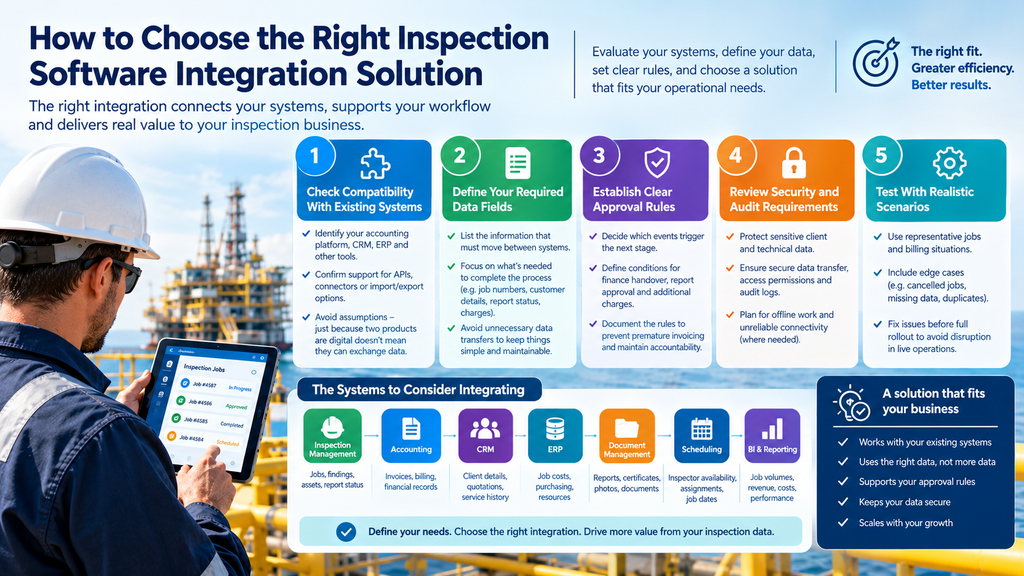
Before selecting software or commissioning a custom integration, inspection companies should evaluate their operational needs.
Identify the accounting platform, CRM, ERP, reporting tools, and other applications currently in use.
Then confirm whether the inspection software supports suitable APIs, existing connectors, import and export options, or middleware-based integrations.
Do not assume that two products can exchange data simply because both support digital workflows.
List the information that must move between systems. Common examples include customer and billing details, job numbers, purchase order references, inspection types, service descriptions, job completion status, report approval status, approved charges, and relevant supporting documents.
Start with the fields required to complete the business process. Unnecessary data transfers increase complexity and can create maintenance problems.
Decide which events allow information to move to the next stage.
For example, should a completed inspection trigger a finance notification, or must the report first pass technical review? Should additional charges require separate approval?
Clearly documented rules help prevent premature invoicing and maintain accountability.
Inspection records may contain commercially sensitive client information and technical evidence. Therefore, integration design should consider access permissions, secure data transmission, audit logs, error handling, and retention requirements.
For offshore and oil and gas operations, teams should also consider unreliable connectivity and whether field personnel need to continue working offline.
Where offline operation is required, confirm how records synchronise after connectivity returns and how conflicting changes are handled.
An integration should not silently fail when a customer record is missing, an API is unavailable, or a required field is incomplete.
Ask how the solution handles failed transactions, duplicate records, retries, notifications, and reconciliation. Finance teams should also be able to identify which jobs have not successfully reached accounting.
Before a full rollout, test the workflow using representative jobs and billing situations.
Include completed jobs, cancelled jobs, additional charges, rejected reports, missing purchase orders, duplicate submissions, and temporary system outages.
This helps reveal problems before they affect live operations.
Inconsistent job references can prevent records from matching across systems. Use a consistent unique job identifier to reduce this risk.
Duplicate customer records can create confusion in reporting and billing. Establish a source of truth for customer data and define how updates should be synchronised.
Incomplete inspection records can delay reports or invoices. Validate mandatory fields at the appropriate stage of the workflow.
Incorrect billing triggers can result in premature invoicing. Define completion criteria, commercial approvals, and the conditions required for finance handover.
Failed synchronisation can prevent information from reaching its destination. Implement error logs, notifications, retry procedures, and reconciliation checks.
Poor staff adoption can lead employees to continue using disconnected spreadsheets. Provide role-based training and clear operating procedures.
Excessive customisation can make integrations harder to maintain. Prioritise essential workflows and use supported integration methods wherever possible.
One practical recommendation is to avoid connecting every application at once. Instead, start with a high-value workflow, confirm that it works reliably, and expand after reviewing the results.
Inspection software integration should be evaluated through measurable operational and financial indicators rather than assumptions about time savings.
| KPI | What It Measures | Why It Matters |
|---|---|---|
| Report turnaround time | Time between inspection completion and report issue | Highlights reporting bottlenecks |
| Job-to-invoice time | Time between the agreed billing milestone and invoice creation | Identifies delays in the finance handover |
| Manual data-entry rate | Repeated entries required per job | Shows whether duplication is decreasing |
| First-pass report approval rate | Reports accepted without rework | Helps assess reporting quality |
| Integration failure rate | Percentage of data transfers that fail | Indicates reliability issues |
| Invoice correction rate | Percentage of invoices requiring correction | Helps identify billing-data problems |
| Completed jobs awaiting billing | Eligible jobs not yet invoiced | Improves visibility into billing backlogs |
| Job profitability | Revenue compared with relevant recorded costs | Supports commercial decision-making |
Record baseline performance before implementation. Then review the same KPIs after rollout, using consistent definitions and comparable reporting periods.
For example, measure job-to-invoice time from the same approved billing milestone each month. Otherwise, the comparison may not accurately reflect the impact of integration.
For oil and gas inspection companies, the right software should support the realities of inspection work, not just the administrative tasks that follow it.
InspectionsTrack, developed by Sky Soft Connections, is an inspection management software suite designed for inspection businesses that need to manage jobs, field activities, technical reporting, and inspection records in a more connected way.
Its capabilities include desktop, mobile, and web-based workflows, online and offline working support, inspection reporting, certificates and templates, client portal functionality, asset history, job management, and inspection-related documentation.
These capabilities can help inspection companies organise the operational information that feeds their wider business processes.
Inspection work often involves several stages, from quotation and mobilisation through to field execution, review, and final report delivery.
InspectionsTrack supports inspection job management and reporting workflows, helping teams maintain organised job records and track relevant inspection information.
For example, an operations coordinator can use the inspection management workflow to organise a job, coordinate inspection activities, and manage the records required for reporting.
This provides a more structured foundation for connecting inspection delivery with downstream administrative processes.
Inspectors working at remote industrial locations may not always have reliable internet access.
InspectionsTrack supports online and offline workflows, helping field teams work in environments where connectivity can be limited. The availability and behaviour of individual features should be confirmed for the relevant device, module, and deployment.
Once field information is available in the system, it can support the subsequent reporting and review process.
Inspection companies need to retrieve historical information, maintain asset records, and produce documentation that reflects the work performed.
InspectionsTrack includes inspection reporting, report templates, certificates, asset history, and supporting document capabilities. These features help teams organise inspection-related information and maintain more consistent records.
Better organised records can also make it easier to identify the information required for billing handovers, client queries, and management reviews.
The operational benefits of inspection software are most valuable when they fit into the company’s wider technology environment.
If your business uses an accounting platform, ERP, or CRM, assess how InspectionsTrack can fit into the existing workflow. Confirm the availability of the specific connector, API, custom integration, or data-transfer method you require before committing to a design.
For example, a company may want to establish a workflow in which approved job information supports invoice preparation in its accounting system. The implementation team would need to confirm the available interfaces, map the required fields, define approval rules, and test the transfer process.
It is important to distinguish between the inspection management capabilities available in the software and any separate integration work that may be required.
Read more : How Inspection Companies Can Scale Operations Without Increasing Administrative Work
The main benefit is a more consistent handover of approved job and billing information. Depending on the integration, this can reduce duplicate data entry, improve invoice preparation, and help finance teams identify jobs that are ready for billing.
Integration may be possible through supported APIs, connectors, middleware, or a custom implementation. However, compatibility should be confirmed for the specific inspection software, Dynamics 365 application, ERP configuration, and required workflow before implementation.
Yes. Smaller companies can benefit from connecting a limited number of essential workflows, such as job records and accounting. A simple, well-tested integration is often more practical than introducing a large, complex system from the beginning.
There is no single implementation timeline. A straightforward data transfer may require considerably less work than a multi-system integration involving custom APIs, approval rules, data migration, and complex accounting processes. The timeline depends on system compatibility, data quality, testing requirements, and the scope of work.
Inspection software integration is not simply about connecting applications. It is about creating a dependable workflow in which operations, technical reporting, and accounting can work with consistent, relevant information.
For oil and gas inspection companies, this can mean clearer job tracking, more organised inspection records, smoother reporting handovers, and better visibility into billing and business performance.
The most effective approach is to start with a specific operational problem, define the required data and approval rules, and test one integration before expanding further.
InspectionsTrack can provide a structured foundation for managing inspection jobs, field activities, reporting, and asset records. By evaluating how it fits with your existing accounting and business systems, you can identify a practical path towards a more connected inspection operation.
Ready to improve your inspection workflows? Explore InspectionsTrack at https://www.inspectionstrack.com/ and book a free trial to see how it may fit your inspection business.
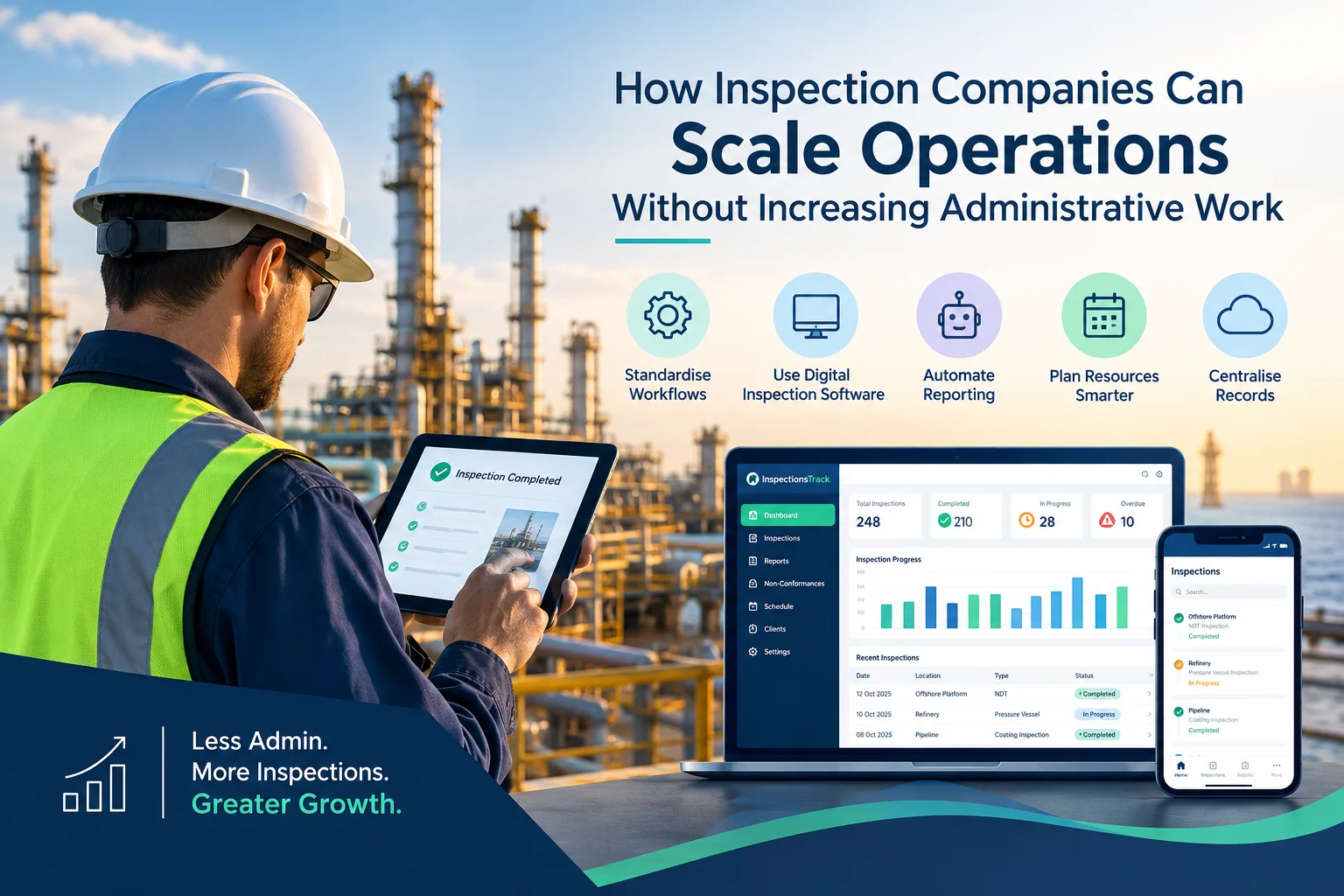
Inspection companies in the oil and gas industry face a common challenge: how to handle more inspections, manage larger projects, and meet client deadlines without increasing administrative workload. As businesses grow, inspection teams must manage…

Meeting client Service Level Agreements (SLAs) is essential for inspection companies working in demanding industries such as oil and gas, energy, and industrial maintenance. Clients expect inspections to be completed on time, reports to be…


